

ブログを作成する
このガイドでは、コンテンツタイプの定義からカテゴリとタグ付きの投稿表示まで、EmDashを使用したブログの作成手順を説明します。
- EmDashサイトのセットアップと稼働(はじめにを参照)
- Astroコンポーネントの基本的な理解
投稿コレクションの定義
Section titled “投稿コレクションの定義”EmDashはセットアップ時にデフォルトの「posts」コレクションを作成します。カスタマイズが必要な場合は、管理ダッシュボードまたはAPIを使用してください。
デフォルトの投稿コレクションには以下が含まれます:
title- 投稿タイトルslug- URLフレンドリーな識別子content- リッチテキスト本文excerpt- 短い説明featured_image- ヘッダー画像(オプション)status- 下書き、公開、または予約済みpublishedAt- 公開日(システムフィールド)
最初の投稿を作成
Section titled “最初の投稿を作成”-
管理ダッシュボード
/_emdash/adminを開く -
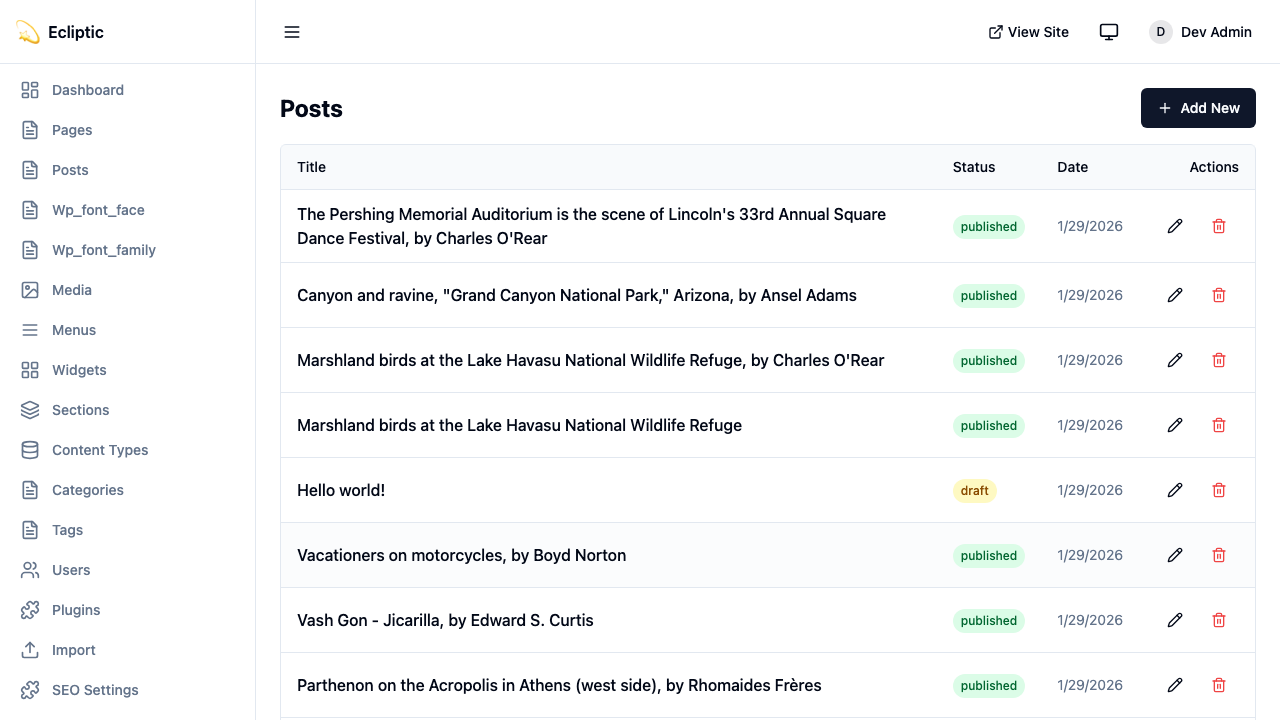
サイドバーの Posts をクリック
-
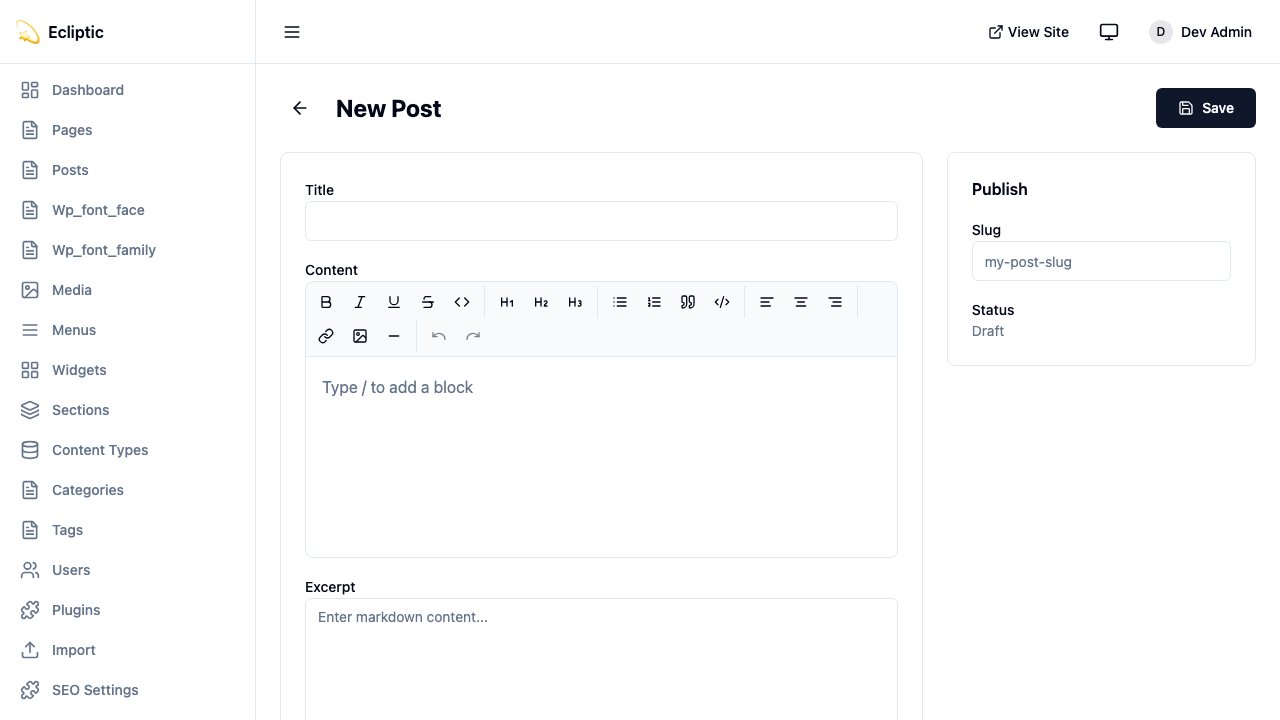
New Post をクリック
-
タイトルを入力し、リッチテキストエディタでコンテンツを記述
-
サイドバーパネルでカテゴリとタグを追加
-
ステータスを Published に設定
-
Save をクリック
投稿が公開されました。再ビルドは不要です。
サイトでの投稿表示
Section titled “サイトでの投稿表示”すべての投稿を一覧表示
Section titled “すべての投稿を一覧表示”公開済み投稿をすべて表示するページを作成:
---import { getEmDashCollection } from "emdash";import Base from "../../../layouts/Base.astro";
const { entries: posts } = await getEmDashCollection("posts", {  status: "published",});
// 公開日でソート(新しい順)const sortedPosts = posts.sort(  (a, b) => (b.data.publishedAt?.getTime() ?? 0) - (a.data.publishedAt?.getTime() ?? 0));---
<Base title="Blog">  <h1>Blog</h1>  <ul>    {sortedPosts.map((post) => (      <li>        <a href={`/blog/${post.data.slug}`}>          <h2>{post.data.title}</h2>          <p>{post.data.excerpt}</p>          <time datetime={post.data.publishedAt?.toISOString()}>            {post.data.publishedAt?.toLocaleDateString()}          </time>        </a>      </li>    ))}  </ul></Base>
個別投稿を表示
Section titled “個別投稿を表示”個別投稿用の動的ルートを作成:
astro title="src/pages/blog/[slug].astro"---import { getEmDashCollection, getEmDashEntry } from "emdash";import { PortableText } from "emdash/ui";import Base from "../../../layouts/Base.astro";
export async function getStaticPaths() {  const { entries: posts } = await getEmDashCollection("posts", {    status: "published",  });
  return posts.map((post) => ({    params: { slug: post.data.slug },  }));}
const { slug } = Astro.params;const { entry: post } = await getEmDashEntry("posts", slug);
if (!post) {  return Astro.redirect("/404");}---
<Base title={post.data.title}> <article> {post.data.featured_image && ( <img src={post.data.featured_image} alt="" /> )} <h1>{post.data.title}</h1> <time datetime={post.data.publishedAt?.toISOString()}> {post.data.publishedAt?.toLocaleDateString()} </time> <PortableText value={post.data.content} /> </article></Base>カテゴリとタグの追加
Section titled “カテゴリとタグの追加”EmDashには組み込みのカテゴリとタグ分類が含まれています。用語の作成と管理の詳細については分類を参照してください。
カテゴリで投稿をフィルタリング
Section titled “カテゴリで投稿をフィルタリング”astro title="src/pages/category/[slug].astro"---import { getEmDashCollection, getTerm, getTaxonomyTerms } from "emdash";import Base from "../../../layouts/Base.astro";
export async function getStaticPaths() { const categories = await getTaxonomyTerms("category");
// 階層カテゴリを平坦化 const flatten = (terms) => terms.flatMap((t) => [t, ...flatten(t.children)]);
return flatten(categories).map((cat) => ({ params: { slug: cat.slug }, props: { category: cat }, }));}
const { category } = Astro.props;
const { entries: posts } = await getEmDashCollection("posts", { status: "published", where: { category: category.slug },});---
<Base title={category.label}> <h1>{category.label}</h1> {category.description && <p>{category.description}</p>}
<ul> {posts.map((post) => ( <li> <a href={`/blog/${post.data.slug}`}>{post.data.title}</a> </li> ))} </ul></Base>投稿カテゴリを表示
Section titled “投稿カテゴリを表示”個別投稿にカテゴリを表示:
astro title="src/components/PostMeta.astro"---import { getEntryTerms } from "emdash";
interface Props {  postId: string;}
const { postId } = Astro.props;const categories = await getEntryTerms("posts", postId, "category");const tags = await getEntryTerms("posts", postId, "tag");---
<div class="post-meta">  {categories.length > 0 && (    <div class="categories">      <span>Categories:</span>      {categories.map((cat) => (        <a href={`/category/${cat.slug}`}>{cat.label}</a>      ))}    </div>  )}
  {tags.length > 0 && (    <div class="tags">      <span>Tags:</span>      {tags.map((tag) => (        <a href={`/tag/${tag.slug}`}>{tag.label}</a>      ))}    </div>  )}</div>
ページネーションの追加
Section titled “ページネーションの追加”投稿数が多いブログにはページネーションを追加:
astro title="src/pages/blog/page/[page].astro"---import { getEmDashCollection } from "emdash";import Base from "../../../../layouts/Base.astro";
const POSTS_PER_PAGE = 10;
export async function getStaticPaths() {  const { entries: allPosts } = await getEmDashCollection("posts", {    status: "published",  });
  const totalPages = Math.ceil(allPosts.length / POSTS_PER_PAGE);
  return Array.from({ length: totalPages }, (_, i) => ({    params: { page: String(i + 1) },    props: { currentPage: i + 1, totalPages },  }));}
const { currentPage, totalPages } = Astro.props;
const { entries: allPosts } = await getEmDashCollection("posts", {  status: "published",});
const sortedPosts = allPosts.sort(  (a, b) => (b.data.publishedAt?.getTime() ?? 0) - (a.data.publishedAt?.getTime() ?? 0));
const start = (currentPage - 1) * POSTS_PER_PAGE;const posts = sortedPosts.slice(start, start + POSTS_PER_PAGE);---
<Base title={`Blog - Page ${currentPage}`}>  <h1>Blog</h1>
  <ul>    {posts.map((post) => (      <li>        <a href={`/blog/${post.data.slug}`}>{post.data.title}</a>      </li>    ))}  </ul>
  <nav>    {currentPage > 1 && (      <a href={`/blog/page/${currentPage - 1}`}>Previous</a>    )}    <span>Page {currentPage} of {totalPages}</span>    {currentPage < totalPages && (      <a href={`/blog/page/${currentPage + 1}`}>Next</a>    )}  </nav></Base>
RSSフィードの追加
Section titled “RSSフィードの追加”ブログ用RSSフィードを作成:
ts title="src/pages/rss.xml.ts"import rss from "@astrojs/rss";import { getEmDashCollection } from "emdash";
export async function GET(context) {  const { entries: posts } = await getEmDashCollection("posts", {    status: "published",  });
  return rss({      title: "私のブログ",      description: "EmDash で作成したブログ",    site: context.site,    items: posts.map((post) => ({      title: post.data.title,      pubDate: post.data.publishedAt,      description: post.data.excerpt,      link: `/blog/${post.data.slug}`,    })),  });}
RSSパッケージがインストールされていない場合はインストール:
npm install @astrojs/rss