

Einen Blog erstellen
Diese Anleitung führt Sie Schritt für Schritt durch die Erstellung eines Blogs mit EmDash, von der Definition des Inhaltstyps bis zur Anzeige von Beiträgen mit Kategorien und Tags.
Voraussetzungen
Abschnitt betitelt „Voraussetzungen“- Eine eingerichtete und laufende EmDash-Website (siehe Erste Schritte)
- Grundlegende Kenntnisse von Astro-Komponenten
Die Beitrags-Sammlung definieren
Abschnitt betitelt „Die Beitrags-Sammlung definieren“EmDash erstellt während der Einrichtung standardmäßig eine Collection namens posts. Wenn Sie sie anpassen möchten, können Sie das im Admin-Dashboard oder über die API tun.
Die Standard-Beitragssammlung enthält:
title- Beitragstitelslug- URL-freundlicher Bezeichnercontent- Rich-Text-Inhaltexcerpt- Kurzbeschreibungfeatured_image- Kopfzeilenbild (optional)status- Entwurf, veröffentlicht oder geplantpublishedAt- Veröffentlichungsdatum (Systemfeld)
Ihren ersten Beitrag erstellen
Abschnitt betitelt „Ihren ersten Beitrag erstellen“-
Öffnen Sie das Admin-Dashboard unter
/_emdash/admin -
Klicken Sie in der Seitenleiste auf Posts
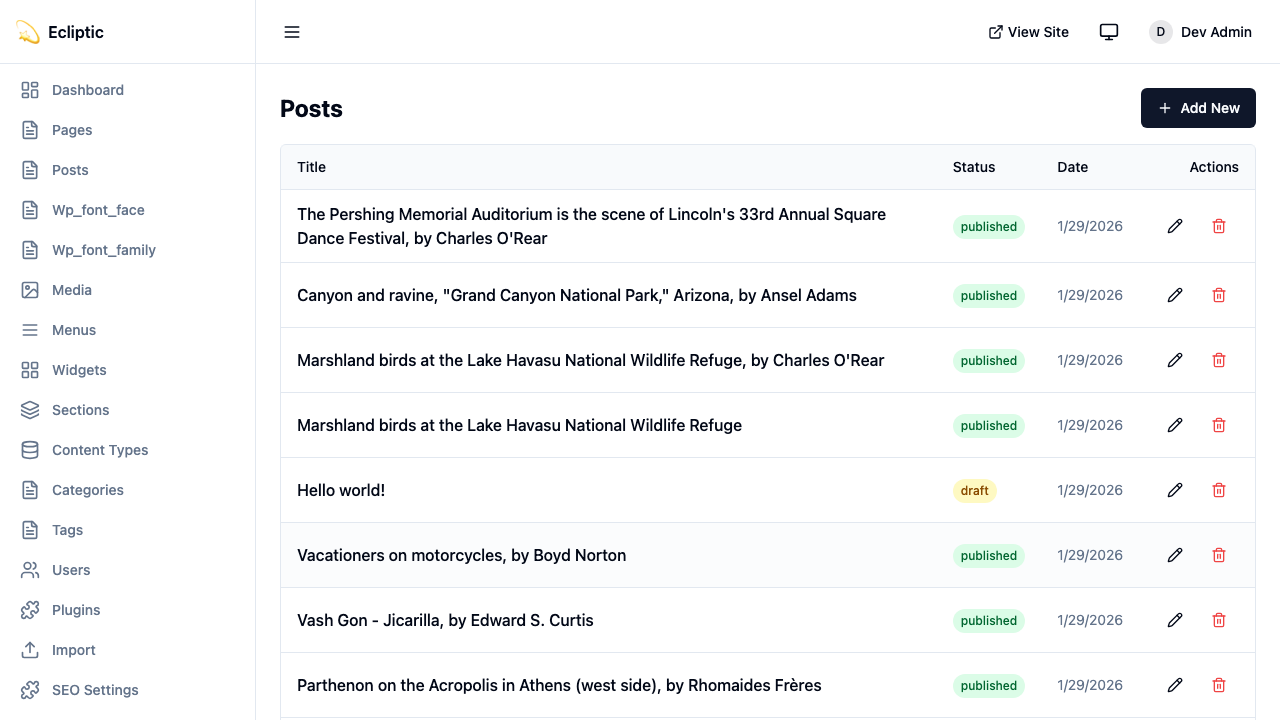
-
Klicken Sie auf New Post
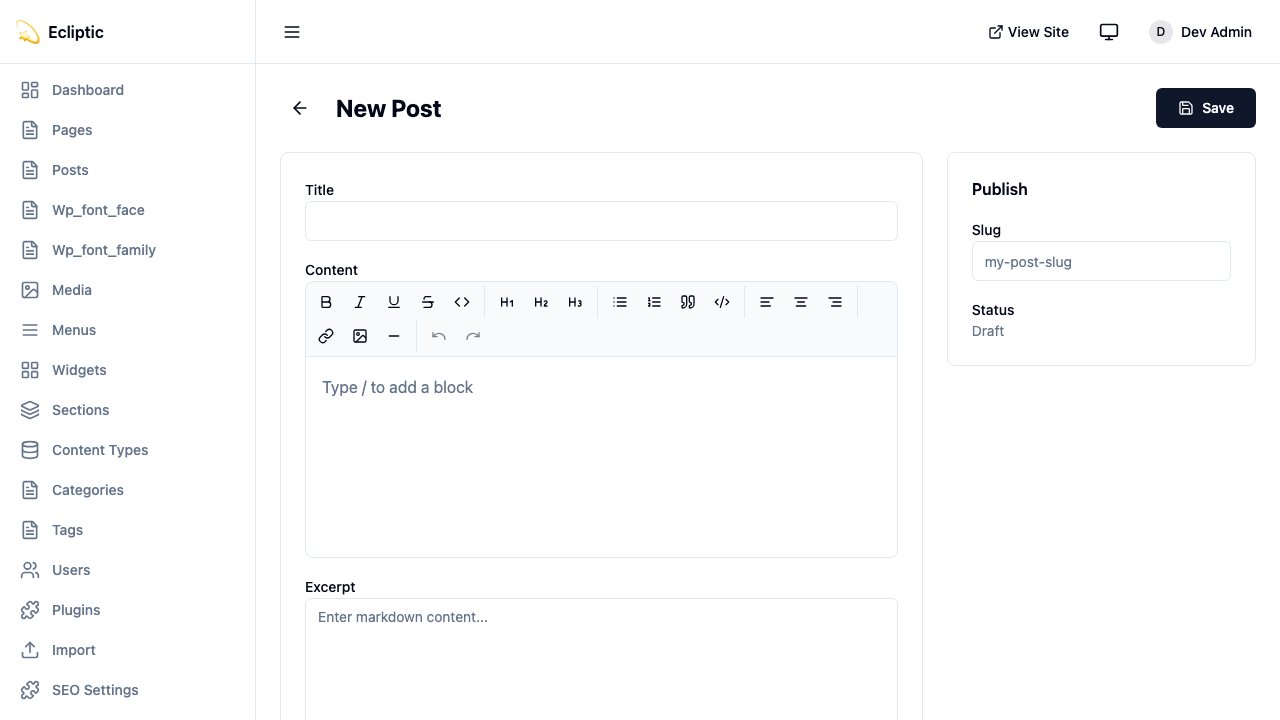
-
Geben Sie einen Titel ein und schreiben Sie Ihren Inhalt mit dem Rich-Text-Editor
-
Fügen Sie Kategorien und Tags im Seitenleisten-Panel hinzu
-
Setzen Sie den Status auf Published
-
Klicken Sie auf Save
Ihr Beitrag ist sofort live. Ein Neubuild ist nicht nötig.
Beiträge auf Ihrer Website anzeigen
Abschnitt betitelt „Beiträge auf Ihrer Website anzeigen“Alle Beiträge auflisten
Abschnitt betitelt „Alle Beiträge auflisten“Erstellen Sie eine Seite, die alle veröffentlichten Beiträge anzeigt:
---import { getEmDashCollection } from "emdash";import Base from "../../../layouts/Base.astro";
const { entries: posts } = await getEmDashCollection("posts", {  status: "published",});
// Nach Veröffentlichungsdatum sortieren, neueste zuerstconst sortedPosts = posts.sort(  (a, b) => (b.data.publishedAt?.getTime() ?? 0) - (a.data.publishedAt?.getTime() ?? 0));---
<Base title="Blog">  <h1>Blog</h1>  <ul>    {sortedPosts.map((post) => (      <li>        <a href={`/blog/${post.data.slug}`}>          <h2>{post.data.title}</h2>          <p>{post.data.excerpt}</p>          <time datetime={post.data.publishedAt?.toISOString()}>            {post.data.publishedAt?.toLocaleDateString()}          </time>        </a>      </li>    ))}  </ul></Base>
Einen einzelnen Beitrag anzeigen
Abschnitt betitelt „Einen einzelnen Beitrag anzeigen“Erstellen Sie eine dynamische Route für einzelne Beiträge:
---import { getEmDashCollection, getEmDashEntry } from "emdash";import { PortableText } from "emdash/ui";import Base from "../../../layouts/Base.astro";
export async function getStaticPaths() {  const { entries: posts } = await getEmDashCollection("posts", {    status: "published",  });
  return posts.map((post) => ({    params: { slug: post.data.slug },  }));}
const { slug } = Astro.params;const { entry: post } = await getEmDashEntry("posts", slug);
if (!post) {  return Astro.redirect("/404");}---
<Base title={post.data.title}> <article> {post.data.featured_image && ( <img src={post.data.featured_image} alt="" /> )} <h1>{post.data.title}</h1> <time datetime={post.data.publishedAt?.toISOString()}> {post.data.publishedAt?.toLocaleDateString()} </time> <PortableText value={post.data.content} /> </article></Base>Kategorien und Tags hinzufügen
Abschnitt betitelt „Kategorien und Tags hinzufügen“EmDash enthält integrierte Kategorie- und Tag-Taxonomien. Siehe Taxonomien für Details zum Erstellen und Verwalten von Begriffen.
Beiträge nach Kategorie filtern
Abschnitt betitelt „Beiträge nach Kategorie filtern“---import { getEmDashCollection, getTerm, getTaxonomyTerms } from "emdash";import Base from "../../../layouts/Base.astro";
export async function getStaticPaths() { const categories = await getTaxonomyTerms("category");
// Hierarchische Kategorien vereinfachen const flatten = (terms) => terms.flatMap((t) => [t, ...flatten(t.children)]);
return flatten(categories).map((cat) => ({ params: { slug: cat.slug }, props: { category: cat }, }));}
const { category } = Astro.props;
const { entries: posts } = await getEmDashCollection("posts", { status: "published", where: { category: category.slug },});---
<Base title={category.label}> <h1>{category.label}</h1> {category.description && <p>{category.description}</p>}
<ul> {posts.map((post) => ( <li> <a href={`/blog/${post.data.slug}`}>{post.data.title}</a> </li> ))} </ul></Base>Beitragskategorien anzeigen
Abschnitt betitelt „Beitragskategorien anzeigen“Zeigen Sie Kategorien auf einzelnen Beiträgen an:
---import { getEntryTerms } from "emdash";
interface Props {  postId: string;}
const { postId } = Astro.props;const categories = await getEntryTerms("posts", postId, "category");const tags = await getEntryTerms("posts", postId, "tag");---
<div class="post-meta">  {categories.length > 0 && (    <div class="categories">      <span>Kategorien:</span>      {categories.map((cat) => (        <a href={`/category/${cat.slug}`}>{cat.label}</a>      ))}    </div>  )}
  {tags.length > 0 && (    <div class="tags">      <span>Tags:</span>      {tags.map((tag) => (        <a href={`/tag/${tag.slug}`}>{tag.label}</a>      ))}    </div>  )}</div>
Paginierung hinzufügen
Abschnitt betitelt „Paginierung hinzufügen“Für Blogs mit vielen Beiträgen fügen Sie Paginierung hinzu:
---import { getEmDashCollection } from "emdash";import Base from "../../../../layouts/Base.astro";
const POSTS_PER_PAGE = 10;
export async function getStaticPaths() {  const { entries: allPosts } = await getEmDashCollection("posts", {    status: "published",  });
  const totalPages = Math.ceil(allPosts.length / POSTS_PER_PAGE);
  return Array.from({ length: totalPages }, (_, i) => ({    params: { page: String(i + 1) },    props: { currentPage: i + 1, totalPages },  }));}
const { currentPage, totalPages } = Astro.props;
const { entries: allPosts } = await getEmDashCollection("posts", {  status: "published",});
const sortedPosts = allPosts.sort(  (a, b) => (b.data.publishedAt?.getTime() ?? 0) - (a.data.publishedAt?.getTime() ?? 0));
const start = (currentPage - 1) * POSTS_PER_PAGE;const posts = sortedPosts.slice(start, start + POSTS_PER_PAGE);---
<Base title={`Blog - Seite ${currentPage}`}>  <h1>Blog</h1>
  <ul>    {posts.map((post) => (      <li>        <a href={`/blog/${post.data.slug}`}>{post.data.title}</a>      </li>    ))}  </ul>
  <nav>    {currentPage > 1 && (      <a href={`/blog/page/${currentPage - 1}`}>Vorherige</a>    )}    <span>Seite {currentPage} von {totalPages}</span>    {currentPage < totalPages && (      <a href={`/blog/page/${currentPage + 1}`}>Nächste</a>    )}  </nav></Base>
Einen RSS-Feed hinzufügen
Abschnitt betitelt „Einen RSS-Feed hinzufügen“Erstellen Sie einen RSS-Feed für Ihren Blog:
import rss from "@astrojs/rss";import { getEmDashCollection } from "emdash";
export async function GET(context) {  const { entries: posts } = await getEmDashCollection("posts", {    status: "published",  });
  return rss({    title: "Mein Blog",    description: "Ein mit EmDash erstellter Blog",    site: context.site,    items: posts.map((post) => ({      title: post.data.title,      pubDate: post.data.publishedAt,      description: post.data.excerpt,      link: `/blog/${post.data.slug}`,    })),  });}
Installieren Sie das RSS-Paket, falls noch nicht geschehen:
npm install @astrojs/rssNächste Schritte
Abschnitt betitelt „Nächste Schritte“- Mit Inhalten arbeiten - Lernen Sie CRUD-Operationen im Admin
- Medienbibliothek - Fügen Sie Bilder zu Ihren Beiträgen hinzu
- Taxonomien - Erstellen Sie benutzerdefinierte Klassifizierungssysteme