

Criar um Blog
Este guia orienta você na criação de um blog com o EmDash, desde a definição do seu tipo de conteúdo até a exibição de posts com categorias e tags.
Pré-requisitos
Seção intitulada “Pré-requisitos”- Um site EmDash configurado e em execução (veja Primeiros Passos)
- Familiaridade básica com componentes Astro
Definir a Coleção de Posts
Seção intitulada “Definir a Coleção de Posts”O EmDash cria uma coleção padrão “posts” durante a configuração. Se precisar personalizá-la, use o painel administrativo ou a API.
A coleção padrão de posts inclui:
title- Título do postslug- Identificador amigável para URLcontent- Corpo do texto em formato ricoexcerpt- Descrição curtafeatured_image- Imagem de cabeçalho (opcional)status- rascunho, publicado ou agendadopublishedAt- Data de publicação (campo do sistema)
Criar Seu Primeiro Post
Seção intitulada “Criar Seu Primeiro Post”-
Abra o painel administrativo em
/_emdash/admin -
Clique em Posts na barra lateral
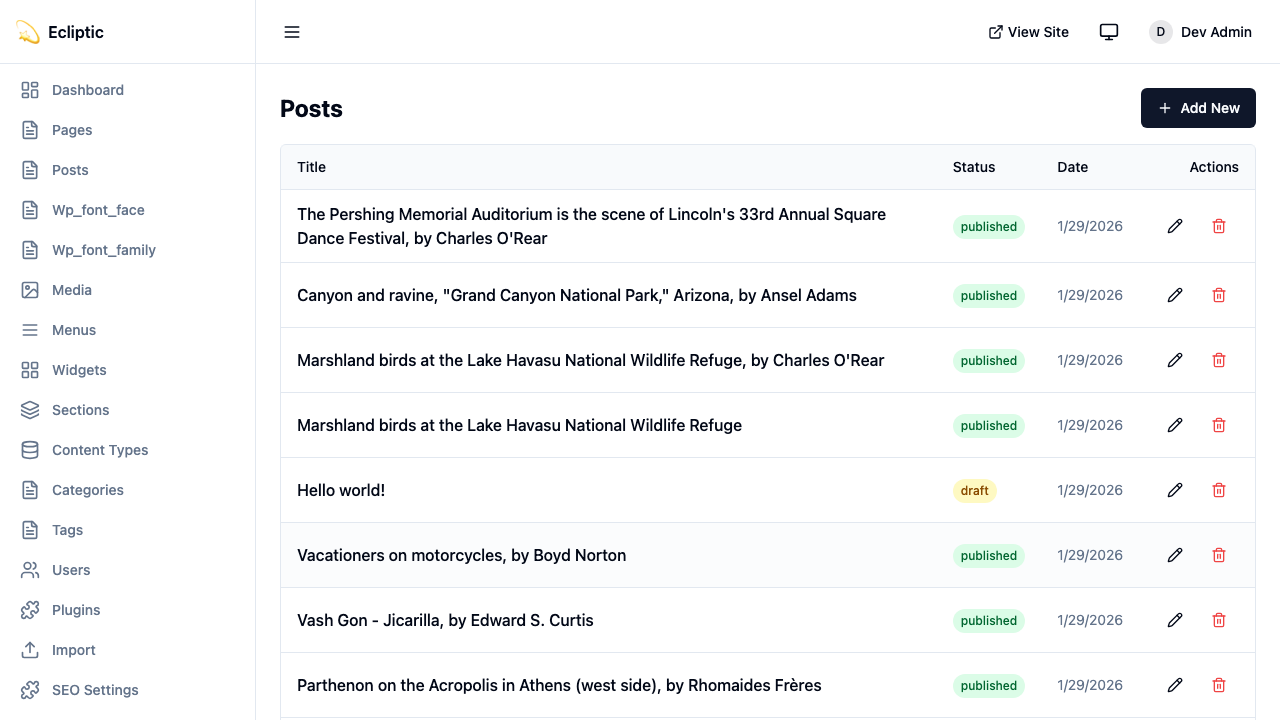
-
Clique em Novo Post
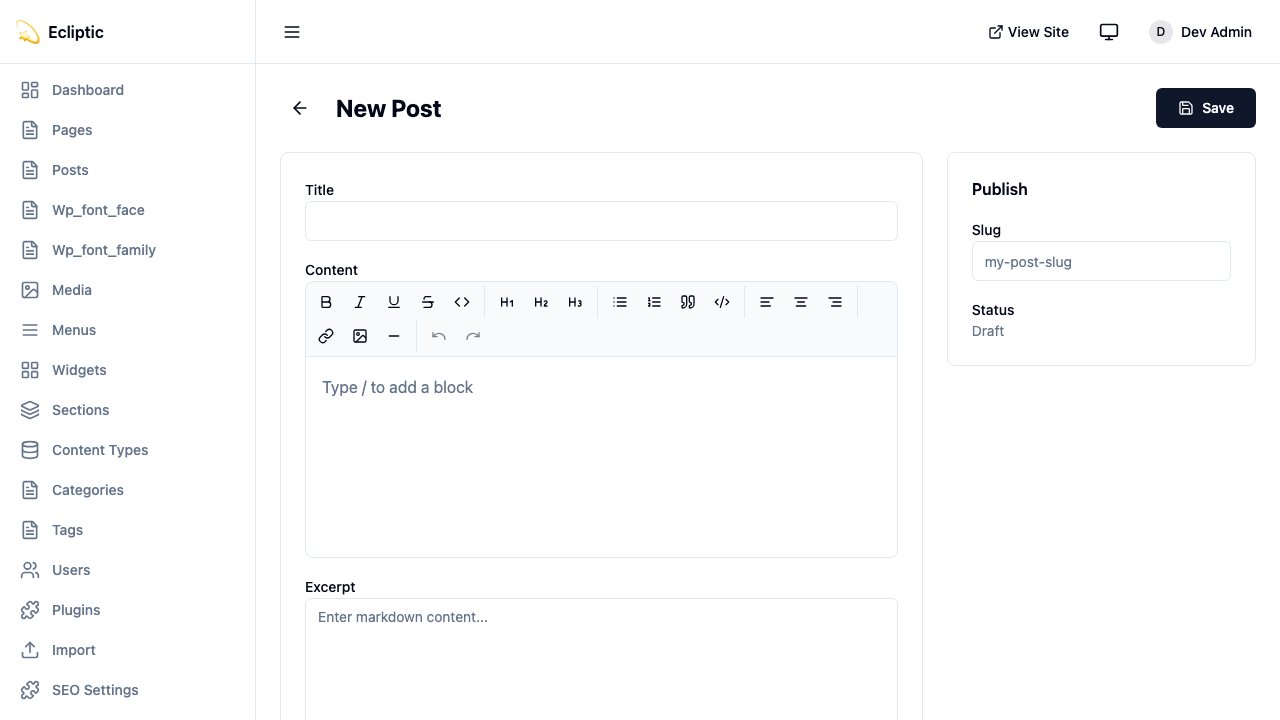
-
Insira um título e escreva seu conteúdo usando o editor de texto rico
-
Adicione categorias e tags no painel lateral
-
Defina o status como Publicado
-
Clique em Salvar
Seu post agora está ao vivo. Nenhuma reconstrução necessária.
Exibir Posts no Seu Site
Seção intitulada “Exibir Posts no Seu Site”Listar Todos os Posts
Seção intitulada “Listar Todos os Posts”Crie uma página que exibe todos os posts publicados:
---import { getEmDashCollection } from "emdash";import Base from "../../../layouts/Base.astro";
const { entries: posts } = await getEmDashCollection("posts", {  status: "published",});
// Ordenar por data de publicação, mais recente primeiroconst sortedPosts = posts.sort(  (a, b) => (b.data.publishedAt?.getTime() ?? 0) - (a.data.publishedAt?.getTime() ?? 0));---
<Base title="Blog">  <h1>Blog</h1>  <ul>    {sortedPosts.map((post) => (      <li>        <a href={`/blog/${post.data.slug}`}>          <h2>{post.data.title}</h2>          <p>{post.data.excerpt}</p>          <time datetime={post.data.publishedAt?.toISOString()}>            {post.data.publishedAt?.toLocaleDateString()}          </time>        </a>      </li>    ))}  </ul></Base>
Exibir um Post Individual
Seção intitulada “Exibir um Post Individual”Crie uma rota dinâmica para posts individuais:
astro title="src/pages/blog/[slug].astro"---import { getEmDashCollection, getEmDashEntry } from "emdash";import { PortableText } from "emdash/ui";import Base from "../../../layouts/Base.astro";
export async function getStaticPaths() {  const { entries: posts } = await getEmDashCollection("posts", {    status: "published",  });
  return posts.map((post) => ({    params: { slug: post.data.slug },  }));}
const { slug } = Astro.params;const { entry: post } = await getEmDashEntry("posts", slug);
if (!post) {  return Astro.redirect("/404");}---
<Base title={post.data.title}> <article> {post.data.featured_image && ( <img src={post.data.featured_image} alt="" /> )} <h1>{post.data.title}</h1> <time datetime={post.data.publishedAt?.toISOString()}> {post.data.publishedAt?.toLocaleDateString()} </time> <PortableText value={post.data.content} /> </article></Base>Adicionar Categorias e Tags
Seção intitulada “Adicionar Categorias e Tags”O EmDash inclui taxonomias de categoria e tag integradas. Veja Taxonomias para detalhes sobre criação e gerenciamento de termos.
Filtrar Posts por Categoria
Seção intitulada “Filtrar Posts por Categoria”astro title="src/pages/category/[slug].astro"---import { getEmDashCollection, getTerm, getTaxonomyTerms } from "emdash";import Base from "../../../layouts/Base.astro";
export async function getStaticPaths() { const categories = await getTaxonomyTerms("category");
// Achatar categorias hierárquicas const flatten = (terms) => terms.flatMap((t) => [t, ...flatten(t.children)]);
return flatten(categories).map((cat) => ({ params: { slug: cat.slug }, props: { category: cat }, }));}
const { category } = Astro.props;
const { entries: posts } = await getEmDashCollection("posts", { status: "published", where: { category: category.slug },});---
<Base title={category.label}> <h1>{category.label}</h1> {category.description && <p>{category.description}</p>}
<ul> {posts.map((post) => ( <li> <a href={`/blog/${post.data.slug}`}>{post.data.title}</a> </li> ))} </ul></Base>Exibir Categorias do Post
Seção intitulada “Exibir Categorias do Post”Mostre categorias em posts individuais:
astro title="src/components/PostMeta.astro"---import { getEntryTerms } from "emdash";
interface Props {  postId: string;}
const { postId } = Astro.props;const categories = await getEntryTerms("posts", postId, "category");const tags = await getEntryTerms("posts", postId, "tag");---
<div class="post-meta">  {categories.length > 0 && (    <div class="categories">      <span>Categorias:</span>      {categories.map((cat) => (        <a href={`/category/${cat.slug}`}>{cat.label}</a>      ))}    </div>  )}
  {tags.length > 0 && (    <div class="tags">      <span>Tags:</span>      {tags.map((tag) => (        <a href={`/tag/${tag.slug}`}>{tag.label}</a>      ))}    </div>  )}</div>
Adicionar Paginação
Seção intitulada “Adicionar Paginação”Para blogs com muitos posts, adicione paginação:
astro title="src/pages/blog/page/[page].astro"---import { getEmDashCollection } from "emdash";import Base from "../../../../layouts/Base.astro";
const POSTS_PER_PAGE = 10;
export async function getStaticPaths() {  const { entries: allPosts } = await getEmDashCollection("posts", {    status: "published",  });
  const totalPages = Math.ceil(allPosts.length / POSTS_PER_PAGE);
  return Array.from({ length: totalPages }, (_, i) => ({    params: { page: String(i + 1) },    props: { currentPage: i + 1, totalPages },  }));}
const { currentPage, totalPages } = Astro.props;
const { entries: allPosts } = await getEmDashCollection("posts", {  status: "published",});
const sortedPosts = allPosts.sort(  (a, b) => (b.data.publishedAt?.getTime() ?? 0) - (a.data.publishedAt?.getTime() ?? 0));
const start = (currentPage - 1) * POSTS_PER_PAGE;const posts = sortedPosts.slice(start, start + POSTS_PER_PAGE);---
<Base title={`Blog - Página ${currentPage}`}>  <h1>Blog</h1>
  <ul>    {posts.map((post) => (      <li>        <a href={`/blog/${post.data.slug}`}>{post.data.title}</a>      </li>    ))}  </ul>
  <nav>    {currentPage > 1 && (      <a href={`/blog/page/${currentPage - 1}`}>Anterior</a>    )}    <span>Página {currentPage} de {totalPages}</span>    {currentPage < totalPages && (      <a href={`/blog/page/${currentPage + 1}`}>Próxima</a>    )}  </nav></Base>
Adicionar um Feed RSS
Seção intitulada “Adicionar um Feed RSS”Crie um feed RSS para o seu blog:
ts title="src/pages/rss.xml.ts"import rss from "@astrojs/rss";import { getEmDashCollection } from "emdash";
export async function GET(context) {  const { entries: posts } = await getEmDashCollection("posts", {    status: "published",  });
  return rss({    title: "Meu Blog",    description: "Um blog construído com EmDash",    site: context.site,    items: posts.map((post) => ({      title: post.data.title,      pubDate: post.data.publishedAt,      description: post.data.excerpt,      link: `/blog/${post.data.slug}`,    })),  });}
Instale o pacote RSS se ainda não o fez:
npm install @astrojs/rssPróximos Passos
Seção intitulada “Próximos Passos”- Trabalhando com Conteúdo - Aprenda operações CRUD no painel administrativo
- Biblioteca de Mídia - Adicione imagens aos seus posts
- Taxonomias - Crie sistemas de classificação personalizados