

内容模型
了解 数据库优先方法。
集合是 EmDash 内容模型的基础。每个集合代表一种内容类型(如文章、页面、产品),并包含用于确定数据结构的字段定义。
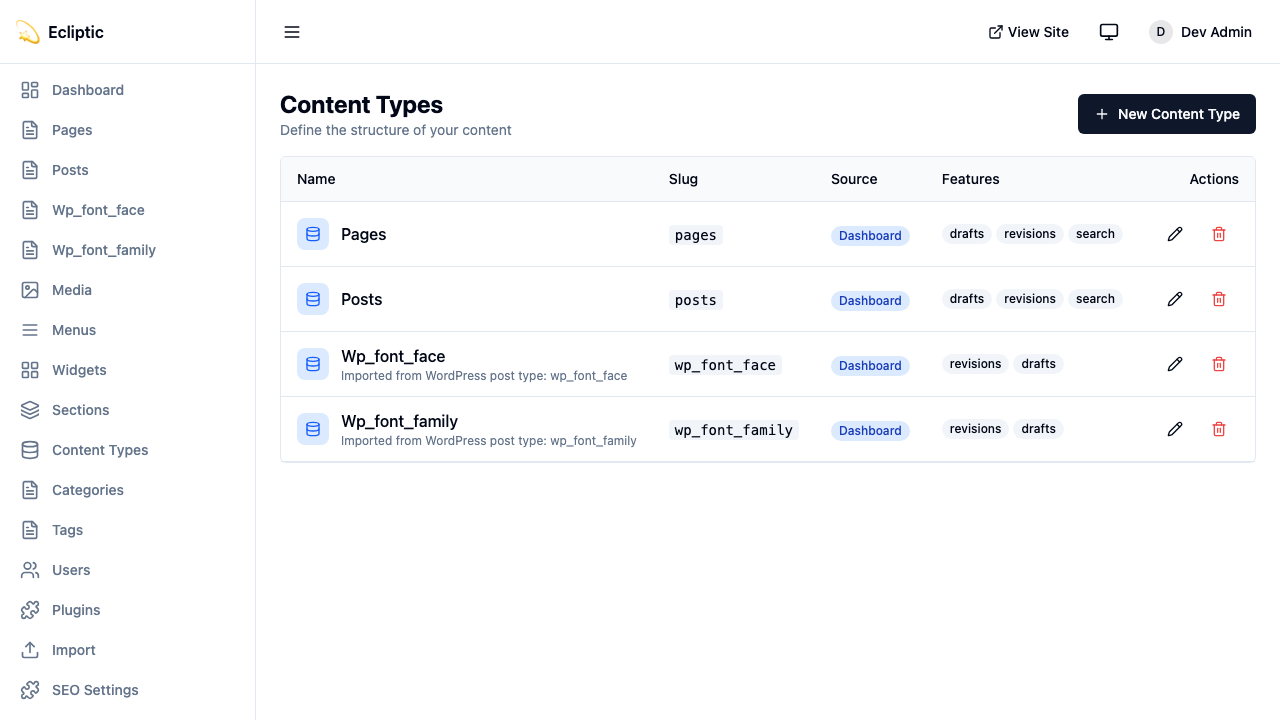
通过管理面板的 内容类型 部分创建集合。每个集合包含:
| 属性 | 描述 |
|---|---|
slug | URL 安全标识符(例如 posts、products) |
label | 显示名称(例如 “博客文章”) |
labelSingular | 单数形式(例如 “文章”) |
description | 面向编辑者的可选描述 |
icon | 管理侧边栏使用的 Lucide 图标名称 |
supports | 支持的功能,如草稿、修订、预览、定时发布、搜索、SEO |
创建集合时,启用你需要的功能:
| 功能 | 描述 |
|---|---|
drafts | 启用草稿/已发布工作流 |
revisions | 通过版本快照跟踪内容历史 |
preview | 为草稿内容生成带签名的预览 URL |
scheduling | 安排内容在未来日期发布 |
// Example collection with all features enabled{ slug: "posts", label: "Blog Posts", labelSingular: "Post", supports: ["drafts", "revisions", "preview", "scheduling"]}EmDash 支持 15 种字段类型,它们映射到 SQLite 列类型:
短文本输入。映射到 TEXT 列。
{ slug: "title", type: "string", label: "Title" }多行文本区域。映射到 TEXT 列。
{ slug: "excerpt", type: "text", label: "Excerpt" }URL 安全的 slug 字段。映射到 TEXT 列。
{ slug: "handle", type: "slug", label: "URL Handle" }富文本编辑器(TipTap/ProseMirror)。以 JSON 格式存储。
{ slug: "content", type: "portableText", label: "Content" }Portable Text 是一种基于块的格式,无需嵌入 HTML 即可保留结构。
任意 JSON 数据。以 JSON 格式存储。
{ slug: "metadata", type: "json", label: "Custom Metadata" }十进制数字。映射到 REAL 列。
{ slug: "price", type: "number", label: "Price" }整数。映射到 INTEGER 列。
{ slug: "quantity", type: "integer", label: "Stock Quantity" }真/假切换。映射到 INTEGER(0/1)。
{ slug: "featured", type: "boolean", label: "Featured Post" }日期和时间选择器。以 ISO 8601 字符串格式存储。
{ slug: "eventDate", type: "datetime", label: "Event Date" }从列表中选择单个选项。映射到 TEXT 列。
{ slug: "status", type: "select", label: "Product Status", validation: { options: ["active", "discontinued", "coming_soon"] }}从列表中选择多个选项。以 JSON 数组格式存储。
{ slug: "features", type: "multiSelect", label: "Product Features", validation: { options: ["wireless", "waterproof", "eco-friendly"] }}从媒体库中选择图片。将媒体 ID 存储为 TEXT。
{ slug: "featuredImage", type: "image", label: "Featured Image" }从媒体库中选择文件。将媒体 ID 存储为 TEXT。
{ slug: "attachment", type: "file", label: "PDF Attachment" }引用另一个集合的条目。将条目 ID 存储为 TEXT。
{ slug: "author", type: "reference", label: "Author", options: { collection: "authors" }}每个字段都支持以下属性:
| 属性 | 类型 | 描述 |
|---|---|---|
slug | string | 数据库中的列名 |
label | string | 管理界面中的显示标签 |
type | FieldType | 15 种字段类型之一 |
required | boolean | 字段是否必须具有值 |
unique | boolean | 值在条目间是否必须唯一 |
defaultValue | unknown | 新条目的默认值 |
validation | object | 特定于类型的验证规则 |
widget | string | 自定义小部件标识符 |
options | object | 小部件特定配置 |
sortOrder | number | 编辑器中的显示顺序 |
validation 对象因字段类型而异:
interface FieldValidation { required?: boolean; // All types min?: number; // number, integer max?: number; // number, integer minLength?: number; // string, text maxLength?: number; // string, text pattern?: string; // string (regex) options?: string[]; // select, multiSelect}带验证的示例:
{ slug: "email", type: "string", label: "Email Address", required: true, unique: true, validation: { pattern: "^[a-zA-Z0-9._%+-]+@[a-zA-Z0-9.-]+\\.[a-zA-Z]{2,}$" }}options 对象用于配置特定于字段的 UI 行为:
interface FieldWidgetOptions { rows?: number; // text (textarea rows) showPreview?: boolean; // image, file collection?: string; // reference (target collection) allowMultiple?: boolean; // reference (multiple refs) [key: string]: unknown; // Custom widget options}引用字段示例:
{ slug: "relatedProducts", type: "reference", label: "Related Products", options: { collection: "products", allowMultiple: true }}使用提供的查询函数来获取内容。这些函数遵循 Astro 的实时集合模式,返回结构化结果:
import { getEmDashCollection, getEmDashEntry } from "emdash";
// Get all entries - returns { entries, error }const { entries: posts } = await getEmDashCollection("posts");
// Filter by statusconst { entries: drafts } = await getEmDashCollection("posts", {  status: "draft",});
// Limit resultsconst { entries: recent } = await getEmDashCollection("posts", {  limit: 5,});
// Filter by taxonomyconst { entries: newsPosts } = await getEmDashCollection("posts", {  where: { category: "news" },});
// Get a single entry by slug - returns { entry, error, isPreview }const { entry: post } = await getEmDashEntry("posts", "my-post-slug");
// Handle errorsconst { entries, error } = await getEmDashCollection("posts");if (error) { console.error("Failed to load posts:", error);}运行 npx emdash types 以根据你的模式生成 TypeScript 类型:
// .emdash/types.ts (generated)export interface Post {  title: string;  content: PortableTextBlock[];  excerpt?: string;  featuredImage?: string;  author: string; // reference ID}
export interface Product { title: string; price: number; description: PortableTextBlock[];}字段类型映射到 SQLite 列类型:
| 字段类型 | SQLite 类型 | 备注 |
|---|---|---|
string | TEXT | |
text | TEXT | |
slug | TEXT | |
number | REAL | 64 位浮点数 |
integer | INTEGER | 64 位有符号整数 |
boolean | INTEGER | 0 或 1 |
datetime | TEXT | ISO 8601 格式 |
select | TEXT | |
multiSelect | JSON | 字符串数组 |
portableText | JSON | 块数组 |
image | TEXT | 媒体 ID |
file | TEXT | 媒体 ID |
reference | TEXT | 条目 ID |
json | JSON | 任意 JSON |